Document and Content Management

Document Management System

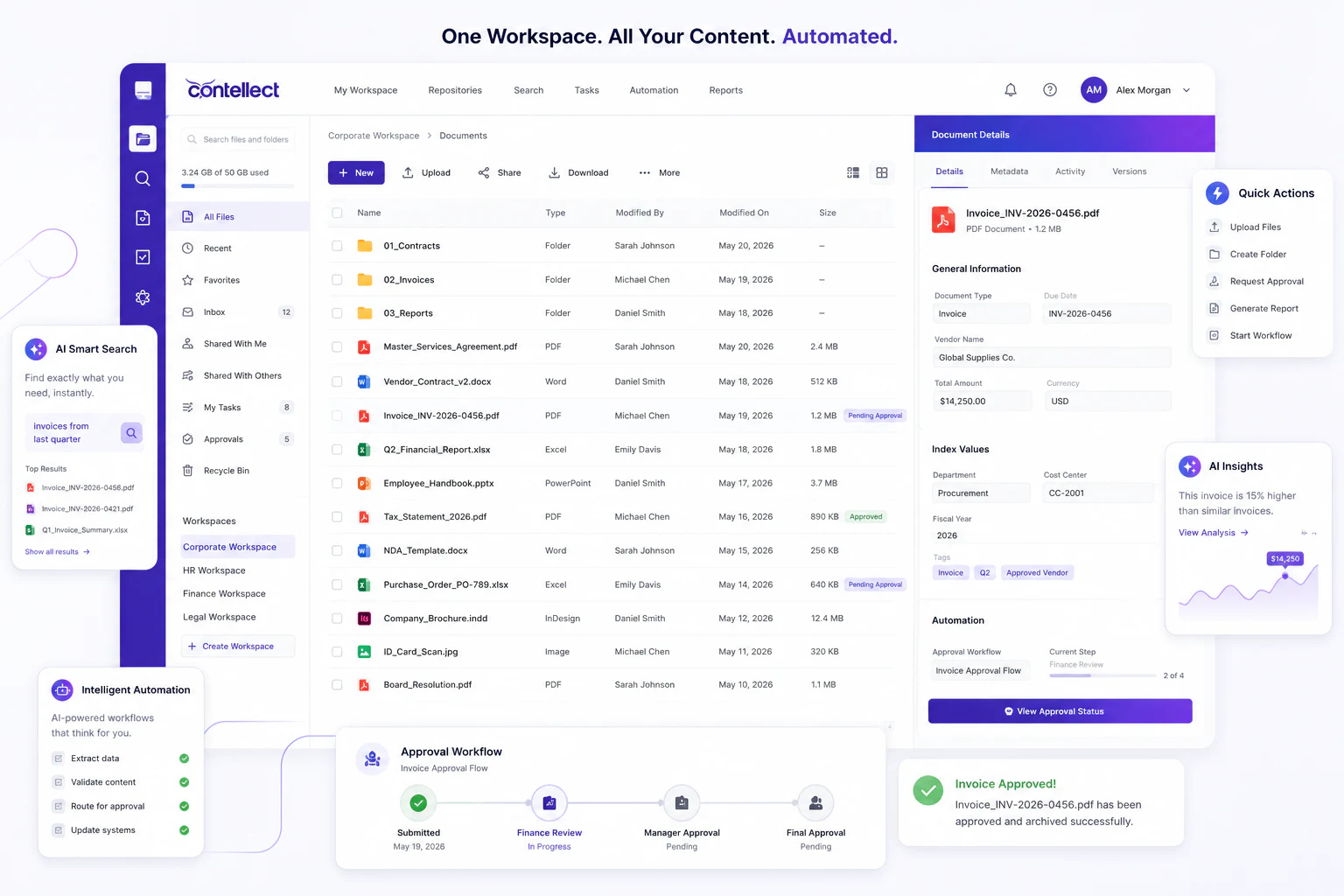
Efficiently organize, store, and retrieve your organization’s critical documents with a robust Document Management System (DMS). Experience seamless document versioning, secure access control, and simplified workflows to enhance productivity across departments.

Document Management System

Implementation Steps:

  • Assess document management needs and define scope.
  • Configure document hierarchies and metadata fields.
  • Integrate the DMS with existing systems.
  • Train users and deploy in phases.

Flow:

  • Documents are uploaded to the centralized repository.
  • Metadata is added to enable categorization and search.
  • Automated workflows guide approvals and reviews.
  • Users access and retrieve documents based on permissions.

Document Management System Use Cases

Legal departments organizing case files securely.

HR teams managing employee records with role-based access.

Finance departments automating document workflows.

What Is Document and Content Management?

Document and content management (DCM) refers to the systematic process of capturing, organising, storing, retrieving, and distributing digital and physical documents across an enterprise. A modern document and content management platform goes far beyond a shared drive – it combines intelligent classification, version control, access governance, and workflow automation into a single, unified system.

As organisations accumulate vast volumes of unstructured data – contracts, invoices, policies, reports, and correspondence – content management document management has become a strategic priority. Without a purpose-built solution, employees waste hours hunting for the right document, compliance teams struggle with audit trails, and critical business knowledge remains siloed.

Core Components of a Document and Content Management System

  • Document Capture & Ingestion – Automatically ingest documents from email, scanners, portals, and third-party applications with AI-powered extraction.
  • Intelligent Classification – Machine learning models categorise documents by type, department, or workflow stage, eliminating manual filing.
  • Metadata & Tagging – Structured metadata makes every document searchable and discoverable within seconds.
  • Version Control – Full revision history ensures teams always work on the latest approved version while retaining all previous drafts.
  • Workflow Automation – Route documents for review, approval, and signature without manual hand-offs or email chains.
  • Access Controls & Audit Trails – Role-based permissions and immutable logs satisfy GDPR, ISO 27001, and industry-specific compliance requirements.
  • Retention & Disposal – Automated retention schedules ensure documents are archived or deleted in line with regulatory obligations.

Benefits of Enterprise Content Management

Organisations that deploy a robust content management document management solution consistently report measurable gains across productivity, compliance, and cost:

  • 40-60% reduction in document retrieval time (Source: AIIM Research)
  • 30% lower storage costs through deduplication and intelligent archiving
  • Near-zero compliance breaches with automated retention policies and audit-ready trails
  • Faster onboarding – new employees find policies and procedures instantly via natural language search
  • Remote-ready operations – cloud-native access means critical content is available anywhere, on any device

ECM vs Traditional DMS: Key Differences

While a traditional Document Management System (DMS) focuses on storing and retrieving files, an Enterprise Content Management (ECM) platform addresses the full content lifecycle. The table below highlights the key distinctions:

FeatureTraditional DMSModern ECM / DCM
Document Storage? Yes? Yes
Intelligent Classification? Manual? AI-powered
Workflow Automation? Limited? Full BPM integration
Natural Language Search? Keyword only? Semantic / NLP
Compliance Automation? Manual? Automated retention
Cloud-Native Architecture? On-premise? Hybrid & cloud

How Contellect Delivers Intelligent Document and Content Management

Contellect’s AI-powered platform combines the best of ECM, intelligent document processing (IDP), and retrieval-augmented generation (RAG) into a single enterprise-grade solution. Our document and content management capabilities include:

  • Zero-touch document classification – models trained on your document taxonomy classify new content automatically on arrival.
  • Semantic search across all content – employees ask questions in plain language and receive precise, source-cited answers drawn from your entire document corpus.
  • Policy-driven retention – configurable retention rules enforce GDPR, HIPAA, and Sarbanes-Oxley obligations without manual oversight.
  • Microsoft 365 & Azure integration – content flows seamlessly between SharePoint, Teams, and Contellect’s ECM layer.

Industry Applications

Financial Services – Automate loan origination, KYC document verification, and regulatory reporting. Eliminate manual classification of contracts, statements, and compliance documentation.

Healthcare – Manage patient records, clinical protocols, and insurance claims with HIPAA-compliant workflows and AI-assisted data extraction.

Government & Public Sector – Digitise paper archives, automate freedom-of-information (FOI) responses, and maintain auditable records of all public-facing documents.

Energy & Oil & Gas – Centralise engineering drawings, safety reports, and compliance certificates with intelligent version control and field-accessible mobile retrieval.

Frequently Asked Questions

What is the difference between document management and content management?
Document management focuses on storing, organising, and retrieving individual files. Content management is broader – it encompasses the creation, review, publication, and disposal of all digital content across its full lifecycle. A modern document and content management system handles both.

Is cloud-based document and content management secure?
Yes – leading platforms like Contellect use AES-256 encryption at rest and in transit, SOC 2 Type II-compliant infrastructure, and granular role-based access controls. Cloud-based ECM is often more secure than on-premise alternatives due to continuous patching and 24/7 security monitoring.

How long does ECM implementation take?
A focused deployment covering core document capture, classification, and search can go live in 4-8 weeks. Full enterprise rollouts with custom workflows and legacy migration typically take 3-6 months.

Can I integrate ECM with my existing ERP or CRM?
Yes. Contellect provides pre-built connectors for Microsoft 365, SAP, Salesforce, and major ERP platforms, plus a REST API for custom integrations.

What industries benefit most from document and content management?
Financial services, healthcare, government, legal, energy, and manufacturing all see significant ROI from ECM due to their high document volumes, strict compliance obligations, and complex approval workflows.

Ready to modernise your content management document management processes? Talk to our team or explore our AI content services to see Contellect in action.

Related enterprise resources: Review the DMS enterprise guide, the output management system guide, and Contellect pricing options for implementation planning.